Showing posts with label security. Show all posts
Showing posts with label security. Show all posts
Friday 11 April 2014
Patching Your OpenShift Origin Against Heartbleed vulnerability
Recently the heartbleed bug was exposed which existed in all the services that used OpenSSL 1.0.1 through 1.0.1f (inclusive) for years already. This weakness allows stealing the information protected, under normal conditions, by the SSL/TLS encryption used to secure the Internet by reading the memory of the system without need of any kind of access.
I've been administering OpenShift applications recently and this post outlines the measures I took to secure the OpenShift applications from this critical vulnerability.
In order to check if you are vulnerable or not, you can either check OpenSSL version:
Alternatively, you can use one of the online tools or the offline python tool to check if you are vulnerable or not.
Note that in case of OpenShift origin, you will have to update the OpenSSL package in brokers and nodes such that all the OpenShift apps are secure.
Once completed, verify the installation of patched version:
We'll have to restart the proxy systems (node-proxy) for the nodes for the effect of the patch. In fact, we will have to restart all the services that use the vulnerable OpenSSL versions.
I hope this helps :)
Read more...
I've been administering OpenShift applications recently and this post outlines the measures I took to secure the OpenShift applications from this critical vulnerability.
In order to check if you are vulnerable or not, you can either check OpenSSL version:
# openssl version -a
OpenSSL 1.0.1e-fips 11 Feb 2013
built on: Wed Jan 8 07:20:55 UTC 2014
platform: linux-x86_64
OpenSSL 1.0.1e-fips 11 Feb 2013
built on: Wed Jan 8 07:20:55 UTC 2014
platform: linux-x86_64
Alternatively, you can use one of the online tools or the offline python tool to check if you are vulnerable or not.
Note that in case of OpenShift origin, you will have to update the OpenSSL package in brokers and nodes such that all the OpenShift apps are secure.
# yum install -y openssl
Once completed, verify the installation of patched version:
# openssl version -a
OpenSSL 1.0.1e-fips 11 Feb 2013
built on: Tue Apr 8 00:29:11 UTC 2014
platform: linux-x86_64
# rpm -q --changelog openssl | grep CVE-2014-0160
- pull in upstream patch for CVE-2014-0160
OpenSSL 1.0.1e-fips 11 Feb 2013
built on: Tue Apr 8 00:29:11 UTC 2014
platform: linux-x86_64
# rpm -q --changelog openssl | grep CVE-2014-0160
- pull in upstream patch for CVE-2014-0160
We'll have to restart the proxy systems (node-proxy) for the nodes for the effect of the patch. In fact, we will have to restart all the services that use the vulnerable OpenSSL versions.
# systemctl restart openshift-node-web-proxy.service
# /bin/systemctl reload httpd.service
# /bin/systemctl reload httpd.service
I hope this helps :)
Read more...

Bookmark this post: | 


|
Friday 28 June 2013
Rename MySQL root User [How To]
MySQL ships with the default user 'root' who has all kind of access to the MySQL database. We often wish to rename this user to something else because of maybe security issues or any other reason. While renaming 'root' to something else is not going to alleviate all sorts of security problems that may arise, it is good idea to rename 'root' to some other name.
Login to the MySQL console and then type the following SQL statements:
It is often good idea to drop anonymous users and the test database because of security reasons. I bet you are never going to use that test database so why keep it? Run the SQL statements as below to do so:
Also, make sure you use strong passwords. You can use mysqladmin to change passwords.
The later two commands are to ensure that no log of any of your MySQL queries or admin level commands have been stored in the history.
I hope this helps :)
Read more...
Login to the MySQL console and then type the following SQL statements:
mysql> use mysql;
mysql> update user set user="some_other_user" where user="root";
mysql> flush privileges;
mysql> update user set user="some_other_user" where user="root";
mysql> flush privileges;
It is often good idea to drop anonymous users and the test database because of security reasons. I bet you are never going to use that test database so why keep it? Run the SQL statements as below to do so:
mysql> drop user "";
mysql> drop database test;
mysql> drop database test;
Also, make sure you use strong passwords. You can use mysqladmin to change passwords.
$ mysqladmin -u my_new_user -p password 's0m3_r4nd0m_$|r0ng_p455'
$ history -c
$ rm ~/.mysql_history
The later two commands are to ensure that no log of any of your MySQL queries or admin level commands have been stored in the history.
I hope this helps :)
Read more...
Bookmark this post: |
|
Tuesday 19 March 2013
How To View Your Gmail Access History Details
I do this thing on a regular basis to know if my account got compromised or not. Well I understand the risks imposed by logging in to my gmail account but still due to several circumstances, I have to login from public PCs. Though I employ some other techniques to trick possible keyloggers/RATs, etc. I do keep running from the dangers of account hijack and hence keep on regularly checking the account history details in gmail.
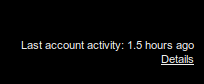
In order to access the gmail history log details, you need to scroll down to the right bottom of your gmail inbox where you will notice the option to view the detail of your account which looks like below:
Moreover, it seems like that the details now include the user agents and/or access type information along with the IP address and time of access to the gmail account.
If you're concerned about unauthorized access to your mail, you'll be able to use the data in the 'Access type' column to find out if and when someone accessed your mail. For instance, if the column shows any POP access, but you don't use POP to collect your mail, it may be a sign that your account has been compromised.
For more information, refer to this page.
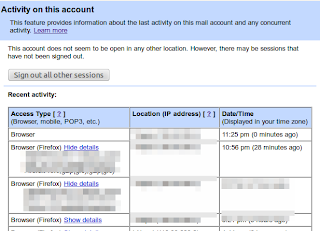
Moreover, this feature lets you log out all of your sessions other than the current session. This can come quite handy whenever you have forgotten to sign out or someone else is having an unauthorized access to your account.
Read more...
In order to access the gmail history log details, you need to scroll down to the right bottom of your gmail inbox where you will notice the option to view the detail of your account which looks like below:

Moreover, it seems like that the details now include the user agents and/or access type information along with the IP address and time of access to the gmail account.
If you're concerned about unauthorized access to your mail, you'll be able to use the data in the 'Access type' column to find out if and when someone accessed your mail. For instance, if the column shows any POP access, but you don't use POP to collect your mail, it may be a sign that your account has been compromised.
For more information, refer to this page.

Moreover, this feature lets you log out all of your sessions other than the current session. This can come quite handy whenever you have forgotten to sign out or someone else is having an unauthorized access to your account.
Read more...
Bookmark this post: |
|
Friday 8 March 2013
Encrypt/Decrypt Confidential Data Using OpenSSL
If you wish to perform encrypted file transfers, openssl provides a robust implementation of SSL v2/3 and TLS v1 as well as full strength generic cryptographic functionalities. Available for almost every commonly used operating system, openssl can be used as a general purpose tool instead of looking for other specialized tools.
If you wish to have full strength cryptographic functions, openssl is a perfect choice. Forget about all other tools that promise to provide high end encryption for your confidential data. Openssl is more than enough for most of your cryptographic needs. Personally, I can't just rely on some random software that promises to provide full strength cryptography but lacks documentations and detailed reviews. Openssl, however, has a well structured documentation and is an open source implementation.
Openssl supports several ciphers such as AES, Blowfish, RC5, etc., several cryptographic hash functions such as MD5, SHA512, etc., and public key cryptographies such as RSA, DSA, etc. Openssl has been widely used in several softwares most notably the OpenSSH.
Now that we know some basics about what OpenSSL is, lets move on encrypting/decrypting files/data using openssl. OpenSSL can take any file and then apply one of the cryptographic functions to encrypt the file. As an example, we encrypt a confidential file 'priv8' with a password "hello" below:
In order to decrypt the encrypted file, we can run the following command:
Now that you know the basic syntax, you can choose among several available cryptographic functions. There are several other symmetric ciphers available for use. The full list of these ciphers is provided by the command:
I hope this helps for your file encryption needs :)
Read more...
If you wish to have full strength cryptographic functions, openssl is a perfect choice. Forget about all other tools that promise to provide high end encryption for your confidential data. Openssl is more than enough for most of your cryptographic needs. Personally, I can't just rely on some random software that promises to provide full strength cryptography but lacks documentations and detailed reviews. Openssl, however, has a well structured documentation and is an open source implementation.
Openssl supports several ciphers such as AES, Blowfish, RC5, etc., several cryptographic hash functions such as MD5, SHA512, etc., and public key cryptographies such as RSA, DSA, etc. Openssl has been widely used in several softwares most notably the OpenSSH.
Now that we know some basics about what OpenSSL is, lets move on encrypting/decrypting files/data using openssl. OpenSSL can take any file and then apply one of the cryptographic functions to encrypt the file. As an example, we encrypt a confidential file 'priv8' with a password "hello" below:
samar@Techgaun:~$ openssl aes-256-cbc -e -in priv8 -out priv8.enc -pass pass:hello
In order to decrypt the encrypted file, we can run the following command:
samar@Techgaun:~$ openssl aes-256-cbc -e -in priv8.enc -out priv8 -pass pass:hello
Now that you know the basic syntax, you can choose among several available cryptographic functions. There are several other symmetric ciphers available for use. The full list of these ciphers is provided by the command:
samar@Techgaun:~$ openssl list-cipher-algorithms
I hope this helps for your file encryption needs :)
Read more...
Bookmark this post: |
|
Thursday 7 March 2013
Make An Encrypted Call On Android Using RedPhone
If you are quite worried about your privacy while making voice calls on your phone, RedPhone is a perfect tool to install in your android phone. RedPhone ensures that the eavesdropping attackers can not sniff your call by providing end-to-end encryption.
RedPhone is an open source communication encryption android software that well-integrates with the system dialer and lets you use the default system dialer and contacts apps to make calls as you normally would. The tool is written by Maxie Morlinspike, the same guy who wrote a famous tool called SSLStrip for performing HTTPS stripping attacks.

It is an open source tool licensed under GPL v3; the github README says, RedPhone is an application that enables encrypted voice communication between RedPhone users. RedPhone integrates with the system dialer to provide a frictionless call experience, but uses ZRTP to setup an encrypted VoIP channel for the actual call. RedPhone was designed specifically for mobile devices, using audio codecs and buffer algorithms tuned to the characteristics of mobile networks, and using push notifications to maximally preserve your device's battery life while still remaining responsive.
If you wish to understand more on Encryption protocol, you should refer to the WIKI.
Read more...
RedPhone is an open source communication encryption android software that well-integrates with the system dialer and lets you use the default system dialer and contacts apps to make calls as you normally would. The tool is written by Maxie Morlinspike, the same guy who wrote a famous tool called SSLStrip for performing HTTPS stripping attacks.
Install RedPhone
It is an open source tool licensed under GPL v3; the github README says, RedPhone is an application that enables encrypted voice communication between RedPhone users. RedPhone integrates with the system dialer to provide a frictionless call experience, but uses ZRTP to setup an encrypted VoIP channel for the actual call. RedPhone was designed specifically for mobile devices, using audio codecs and buffer algorithms tuned to the characteristics of mobile networks, and using push notifications to maximally preserve your device's battery life while still remaining responsive.
If you wish to understand more on Encryption protocol, you should refer to the WIKI.
Install RedPhone
Read more...
Bookmark this post: |
|
Tuesday 12 February 2013
Chaining The Proxies With ProxyChains
In this tutorial, we will learn to redirect our TCP traffics through the chain of proxies using a well known tool named ProxyChains.
ProxyChains is a tool for tunneling TCP and DNS traffics through chain of several proxy servers which supports HTTP, SOCKS4, and SOCKS5 proxy servers. Hence, this tool leverages several usages such as anonymity, bypassing filters, running any program through proxy servers, etc.
You can DOWNLOAD proxychains from SourceForge. In ubuntu, you can directly install it from repos:
Once you have installed the proxychains, you need to configure this tool. The global configuration file is located at /etc/proxychains.conf so if you wish to have your own configuration file, you could either create the proxychains.conf file in the current working directory or at $HOME/.proxychains/proxychains.conf.
In my example, I'll edit the global configuration file by issuing the command:
First, we will have to select the kind of chaining option we want to use. We can use one of the dynamic_chain, strict_chain, and random_chain chaining options. In most cases, it is good to just use the dynamic_chain so we uncomment the line containing dynamic_chain and comment all other chaining options.
Then we need to grab some proxies and then insert at the end of our configuration file which would look like:
You could add as much as proxy servers in the list. Btw, the asterisks in the above example do not mean wildcards, they are just there to symbolize some proxy server. There are free sites on the Internet which provide big database of different kinds of proxies. Even several proxy scrapers are available all over the internet and you could even write one on your own. So getting list of good proxies is not the difficult job. Once you finish the configuration, you can run any command through proxychains. The syntax is as simple as below:
For example, below is the example nmap scan run through the proxychains:
P.S. If you are interested in some GUI for using proxychains, you can use ProxyChainsGUI. Lastly, the default package from Ubuntu repository seems to be missing the proxyresolv command so I would recommend to compile the source code locally.
Read more...
ProxyChains is a tool for tunneling TCP and DNS traffics through chain of several proxy servers which supports HTTP, SOCKS4, and SOCKS5 proxy servers. Hence, this tool leverages several usages such as anonymity, bypassing filters, running any program through proxy servers, etc.
You can DOWNLOAD proxychains from SourceForge. In ubuntu, you can directly install it from repos:
samar@samar-Techgaun:~$ sudo apt-get install proxychains
Once you have installed the proxychains, you need to configure this tool. The global configuration file is located at /etc/proxychains.conf so if you wish to have your own configuration file, you could either create the proxychains.conf file in the current working directory or at $HOME/.proxychains/proxychains.conf.
In my example, I'll edit the global configuration file by issuing the command:
samar@samar-Techgaun:~$ sudo nano /etc/proxychains.conf
First, we will have to select the kind of chaining option we want to use. We can use one of the dynamic_chain, strict_chain, and random_chain chaining options. In most cases, it is good to just use the dynamic_chain so we uncomment the line containing dynamic_chain and comment all other chaining options.
Then we need to grab some proxies and then insert at the end of our configuration file which would look like:
socks4 127.0.0.1 9050
socks5 192.168.2.90 3128
socks5 1**.1**.*.* 8080
socks5 192.168.2.90 3128
socks5 1**.1**.*.* 8080
You could add as much as proxy servers in the list. Btw, the asterisks in the above example do not mean wildcards, they are just there to symbolize some proxy server. There are free sites on the Internet which provide big database of different kinds of proxies. Even several proxy scrapers are available all over the internet and you could even write one on your own. So getting list of good proxies is not the difficult job. Once you finish the configuration, you can run any command through proxychains. The syntax is as simple as below:
samar@samar-Techgaun:~$ proxychains <any_command>
For example, below is the example nmap scan run through the proxychains:
samar@samar-Techgaun:~$ proxychains nmap -p 1-1000 -O victim.tld
P.S. If you are interested in some GUI for using proxychains, you can use ProxyChainsGUI. Lastly, the default package from Ubuntu repository seems to be missing the proxyresolv command so I would recommend to compile the source code locally.
Read more...
Bookmark this post: |
|
Saturday 26 January 2013
Subterfuge - An Automated MITM Attack Framework
Subterfuge is a very useful tool for hackers and security experts for automating the man-in-the-middle attacks. It provides a complete framework for automating different kinds of MITM attacks.
Subterfuge largely transforms the complexity of performing the man-in-the-middle attacks with the tools such as ettercap and makes it far more easier to launch various form of MITMs. Hence, even a general computer user can perform MITM using this tool. Subterfuge provides a very clear interface accessible over HTTP through browser through which we can view the intercepted authentication data. The tool also supports several other form of MITM attacks such as session injection, http code injection, fake AP, and DNS spoofing.
Currently, the 4.3 beta version of this tool is available as the latest release. You can download the tool and read about the tool at code.google.com/p/subterfuge.
Installation is straightforward. Download the tar file from the above link and then run the following commands in terminal:
After a while, the installation will complete. Now you can run the subterfuge framework by typing subterfuge in your terminal. Enjoy hacking :)
Read more...
Subterfuge largely transforms the complexity of performing the man-in-the-middle attacks with the tools such as ettercap and makes it far more easier to launch various form of MITMs. Hence, even a general computer user can perform MITM using this tool. Subterfuge provides a very clear interface accessible over HTTP through browser through which we can view the intercepted authentication data. The tool also supports several other form of MITM attacks such as session injection, http code injection, fake AP, and DNS spoofing.
Currently, the 4.3 beta version of this tool is available as the latest release. You can download the tool and read about the tool at code.google.com/p/subterfuge.
Installation is straightforward. Download the tar file from the above link and then run the following commands in terminal:
samar@samar-Techgaun:~$ tar -xvf SubterfugePublicBeta4.3.tar.gz
samar@samar-Techgaun:~$ python install.py -i
After a while, the installation will complete. Now you can run the subterfuge framework by typing subterfuge in your terminal. Enjoy hacking :)
Read more...
Bookmark this post: |
|
Friday 11 January 2013
Java 0-day In The Wild - Disable Java Plugin NOW
Security researchers have discovered yet another critical Java 0-day exploit being used by majority of the browser exploit packs such as Blackhole and Cool. Users are urged to DISABLE the Java plugin RIGHT NOW.
French researcher Kaffeine discovered that the java 0-day has been spotted to be making big hits daily, in a blog post. This particular exploit has proven to be very serious threat for the users. The folks at AlienVault Lab have also reproduced the exploit and it seems to work over all the java versions across all platforms which is a very serious threat.
As for now, the users are highly urged to disable their JAVA plugins right now so that they do not get hit by these 0-days.
So what are you waiting for?
How To Disable Java Plugin
Kaffeine's blog post
Alien Vault Labs Post
Read more...
French researcher Kaffeine discovered that the java 0-day has been spotted to be making big hits daily, in a blog post. This particular exploit has proven to be very serious threat for the users. The folks at AlienVault Lab have also reproduced the exploit and it seems to work over all the java versions across all platforms which is a very serious threat.
As for now, the users are highly urged to disable their JAVA plugins right now so that they do not get hit by these 0-days.
So what are you waiting for?
Important links:
How To Disable Java Plugin
Kaffeine's blog post
Alien Vault Labs Post
Read more...
Bookmark this post: |
|
Subscribe to:
Posts (Atom)